Choosing a wall mount rack frame can dramatically improve equipment organization, airflow, and accessibility in small spaces. This guide reviews five reliable options that balance sturdiness, depth, and ease of installation. Each product supports standard 19″ rack equipment and offers features designed for quick maintenance and flexible mounting. Read on to compare capabilities and decide which wall mount rack best fits your needs.
Summary of Selected Products
- NavePoint 6U Open Frame 19 Inch Wall Mount Rack — 16″ depth — 200 lbs capacity
- NavePoint 9U Open-Frame Wall Mount Rack — 18″ depth — 55 lbs capacity
- Tecmojo 4U Wall Mount Rack — 14″ depth — 110 lbs capacity
- Tecmojo 9U Open Frame Wall Mount Rack — 18″ depth — 50 kg (110 lbs) capacity
- JINGCHENGMEI 6U Open Frame Rack — 13″ depth (adjustable 13–18″) — 19″ standard equipment support
NavePoint 6U Open Frame Wall Mount Rack

The NavePoint 6U open frame wall mount rack is designed for standard 19″ equipment and is built from 1.5mm SPCC cold rolled steel. It measures 15.8″L x 20″W x 13.65″H with a 16″ depth and supports up to 200 lbs. An open design improves airflow, making it easier to install, manage, and cool devices like switches and patch panels. The unit arrives flat-packed for straightforward assembly and is adaptable for 2-post mounting in tight spaces.
NavePoint 9U Open-Frame Rack
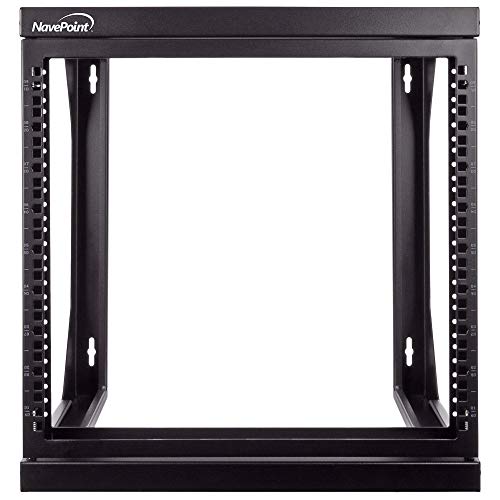
This 9U wall-mount rack from NavePoint uses 1.5mm cold-rolled steel and features a 180-degree dual-hinged front swing gate for full rear panel access. With a depth of 18 inches and a maximum weight capacity of 55 lbs, it is suitable for servers, AV, and network gear. The open frame design encourages heat dissipation and easy cable management, while the cable access is simplified by the swinging front door and flexible mounting options.
Tecmojo 4U Wall Mount Rack

Tecmojo’s 4U wall mount rack offers a sturdy cold-rolled steel frame with a 110 lbs (50 kg) capacity and an 14-inch maximum mounting depth. Its electrostatic powder coating provides rust resistance, and the open frame design allows immediate access for installations or servicing. The unit can be used on walls or placed flat, with side-panel cable management to streamline organization and maintenance.
Tecmojo 9U Open Frame Wall Mount Rack

This 9U swing-out wall mount rack from Tecmojo features 18-inch depth and 16-inch apart mounting holes, with square or tapped hole installation options. Made from cold rolled steel and powder-coated for durability, it supports up to 110 lbs and includes a 180-degree swing gate for rear cable access. The design prioritizes heat dissipation and flexible installation to accommodate various IT and AV devices.
Tecmojo 6U Fixed Wall Mount Network Rack

The 6U fixed wall mount rack from Tecmojo uses a sturdy open frame design with rear brackets to boost stability and a 110 lbs capacity. It offers space-saving installation on walls or floors and supports easy access for installation and cable management, aided by its open frame construction and durable powder-coated finish.
Product Comparison At A Glance
| Product | Depth | U Capacity | Weight Capacity | Open/ Swing Feature | Key Benefit |
|---|---|---|---|---|---|
| NavePoint 6U Open Frame | 16″ depth | 6U | 200 lbs | Open frame | High capacity, versatile mounting |
| NavePoint 9U Open-Frame | 18″ depth | 9U | 55 lbs | Swing gate | Excellent access to rear panels |
| Tecmojo 4U | 14″ depth | 4U | 110 lbs | Open frame | Lightweight yet sturdy, easy installation |
| Tecmojo 9U Open Frame | 18″ depth | 9U | 110 lbs | Swing gate | Flexible mounting with rear access |
| JINGCHENGMEI 6U | 13″ (adjustable 13–18″) | 6U | Not specified | Open frame | Adjustable depth for deep equipment |
Buying Guide: How To Choose The Right Wall Mount Rack Frame
Selecting the right wall mount rack frame depends on equipment size, weight, accessibility needs, and space constraints. Consider these factors to ensure a durable, scalable solution:
- Depth and mounting options: Choose a depth that fits your equipment and allows air to circulate. Some models offer adjustable depths or multiple mounting hole densities (12″–18″ spacing) to accommodate different devices.
- Internal capacity vs. future growth: Plan for current devices and potential additions. Higher U capacity provides room for expansion without relocating gear.
- Access and cable management: Swing-out doors or full 180-degree access simplify maintenance. Side or rear panels should support clean cable runs and strain relief.
- Material quality and finish: Cold-rolled steel with powder coating offers durability and corrosion resistance, important in environments with humidity or dust.
- Installation type: Decide between wall-mounted and floor-based options as well as dual-use designs. Open frame racks improve airflow but may require additional mounting hardware or shelves for organized storage.
- Weight handling: Ensure the model can safely support the total weight of all equipment. Note the maximum load rating per unit and distribute weight evenly.
- Ease of assembly: Some racks come flat-packed; others arrive pre-assembled. Consider how much time you can allocate to setup.
For environments requiring frequent access to rear cables or future reconfigurations, models with swing gates and wide mounting hole options tend to offer better long-term usability. In spaces with strict space limits, deeper racks can maximize vertical space without expanding the footprint.
Security and aesthetics may also matter. A clean, organized rack helps reduce cable tension and accidental disconnections, improving reliability for critical connections. If the space is shared or visible to clients, a neat, professional setup reinforces IT and AV readiness.
Finally, verify compatibility with your existing 19″ equipment: switches, patch panels, servers, and AV gear typically follow the 19″ standard, but verify mounting hole patterns and depth compatibility before purchase.