Keep your entertainment area tidy with cable hider kits designed for wall-mounted TVs. This guide highlights five top options that help conceal power cords and AV cables while blending with interior design. Each product offers different installation approaches, from in-wall channels to surface-mounted raceways, and supports various wall types. Read on to compare features, installation ease, and safety considerations to choose the right kit for your space.
| Product | Key Benefit | Wall Type Support | Installation Style |
|---|---|---|---|
| Delamu Cord Hider | Easy Click-On-Click-Off design | Drywall, Plaster | Surface-mounted raceway |
| Mount-It! In-Wall Kit | Recessed power with drywall saw kit | Most drywall constructions | In-wall concealment |
| ECHOGEAR In-Wall Kit | ETL In-Wall certified, pre-wired | Standard interiors | In-wall device modules |
| YesBes 116in Kit | UL94 V-0 flame retardant material | Smooth walls | Surface-mounted raceway |
| PRLF In-Wall Kit | Two-hole setup, drill-friendly | Deep cavities required | In-wall raceway |
Delamu Cord Hider — 157 Inch Wall Cord Cover Kit

Delamu offers a long, extendable cord hider designed to run along walls and hide multiple cables. This kit emphasizes a user-friendly Attach & Snap design to simplify setup, reducing the effort required to organize wires behind a TV or desk. The materials undergo UL94 V-0 flame retardancy testing, adding a safety layer for daily use. It is positioned as a durable solution for living rooms and home offices where visible cables could disrupt the décor. Installation tends to be straightforward, and the raceway can be cut to fit longer wall stretches as needed.
Mount-It! In-Wall TV Cable Concealer Kit
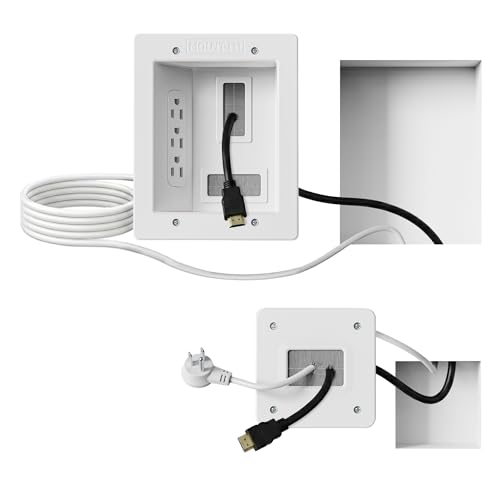
This kit focuses on a recessed approach, allowing a cleaner, pro-style look by running power and AV cables behind the wall. It includes a drywall saw and a template for a guided, DIY install in under 30 minutes, making it a practical option for renters and homeowners. The design accommodates multiple cables—HDMI, Ethernet, and A/V—without sacrificing accessibility. It is well-suited for a modern living room or home theater where a tidy entertainment zone is desired without visible cords.
Riozoo TV Wire Hider Kit — Wall Mount Ready
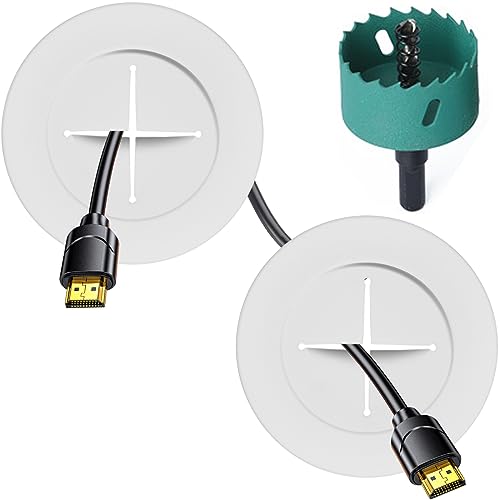
Riozoo’s in-wall cable management kit is designed to blend with wall decor, focusing on perforated or common wall types (like plaster or wood). It includes thicker hole saw and drilling accessories to improve fit and simplify the process. The kit is intended for organizing cables behind a wall-mount TV, gaming consoles, and other entertainment devices, offering a discreet, professional finish while prioritizing ease of installation.
BGHEOUYV 4 Pack — In-Wall Cable Management System
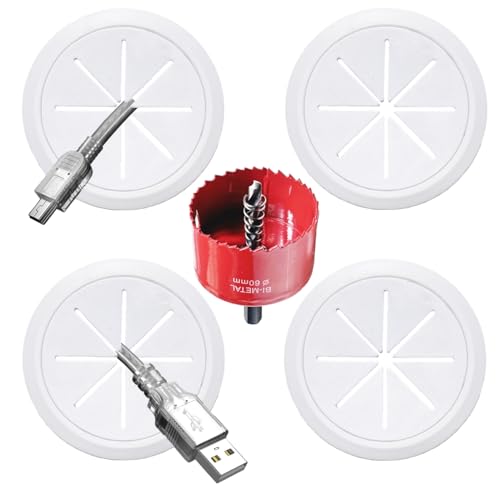
BGHEOUYV provides a 4-pack set for in-wall cable concealment, including multiple pass-throughs and a hole saw attachment. The kit emphasizes a clean result by mounting cables behind the wall to reduce visible wires. The components are described as rugged and long-lasting, designed to support a neat, clutter-free TV area while enabling straightforward installation with standard DIY tools.
ECHOGEAR In-Wall Cable Management Kit

This in-wall kit is ETL-certified for in-wall use and emphasizes safety and code compliance when routing power and low-voltage cables behind the wall. It includes 3.75” diameter by 3.25” depth modules and a 6-foot extension cord, designed to position outlets and devices exactly where needed. The installation is positioned as a practical DIY upgrade that reduces visible wires while maintaining accessibility for future connections.
Buying Guide: Key Purchase Considerations
- In-wall vs. surface-mounted: In-wall systems offer a cleaner look but require more tools and wall access. Surface-mounted raceways are easier to install, often suitable for renters, and less invasive to walls.
- Wall type and cavity depth: Check wall thickness, studs, and cavity depth to confirm compatibility with the kit’s holes, outlets, and modules. Some kits require a minimum cavity depth to accommodate outlets or modules.
- Safety certifications: Look for UL94 V-0 flame retardancy for plastic components and ETL or equivalent certifications for in-wall use to ensure electrical safety and compliance.
- Cable capacity and compatibility: Consider how many and which types of cables you need to conceal (HDMI, USB, Ethernet, power). Ensure the kit’s channels, holes, and pass-throughs align with your devices.
- Installability for renters: Kits with simple snap-on designs or included templates are ideal for temporary setups, whereas in-wall systems may imply permanent changes.
- Aesthetic options: Color, finish, and profile matter for blending with wall color or furniture. Some kits offer paintable surfaces to match your walls.
- Future accessibility: If you anticipate adding devices, choose a system with modular components or easy access to power outlets and HDMI ports.
Across these options, the common goal is to deliver a neat, organized entertainment area by concealing cables behind or along walls. Each kit has its own strengths—ease of installation, depth requirements, and regulatory compliance—that suit different home layouts, wall types, and user preferences. When selecting, align the choice with your wall construction, desired finish, and the number of cables to manage for a polished, distraction-free TV setup.